


Easee - Share & Chat
4.3110.00 Reviews
App Specs
- Version
- 1.1.8
- Updated On
- License
- Free
- Downloads
- 1,000,000+
- Developer
- Bonbon Team
- Categories
- Social
- Platform
- Android
Screenshots




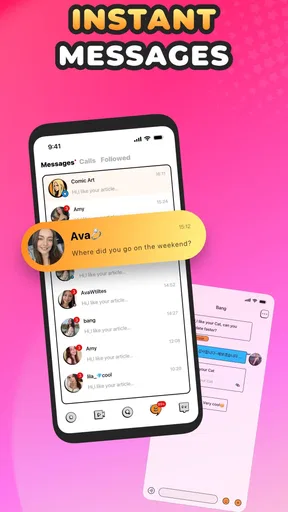
 Analysis by AppCompare
I approached Easee - Share & Chat as a social app for making conversations more active rather than as another place to collect silent contacts. Its basic promise is simple: meet people and take part in enjoyable activities, with chat sitting at the center of the experience. After spending time with it, my impression is that it works best when I use it with a clear reason to connect, not when I open it expecting the app to create a complete social life for me.
The app comes from Bonbon Team and is free to install, although optional in-app purchases range from $0.99 to $99.99 per item. It is intended for mature users aged 17 and over, which is important to keep in mind before joining conversations. The current version is 1.1.8, and it runs on Android 7.0 or later. Those details make it accessible to many older devices, but the mature rating also means I would not treat it as a casual app for younger family members.
How I use Easee from the first chat onward
I begin by treating the first chat as a small test of fit, not a commitment: I look for a natural opening, share only what feels comfortable, and see whether the other person contributes too. That makes it easier to decide which conversations deserve a second visit. From there, a little preparation can prevent avoidable friction before I settle into a routine.
A better starting point than simply browsing
My most useful first step was to decide what I wanted from the app before trying to meet anyone. There is a meaningful difference between looking for light conversation, finding people for shared activities, and checking whether the app can become a regular social routine. Easee - Share & Chat is easier to judge when I use one of those goals as a filter.
For a new user, the sensible baseline workflow is straightforward. I open the app, look at the available social opportunities, and pay attention to whether the conversation feels natural before investing much time. Rather than sending the same greeting repeatedly, I respond to something specific. That small change makes the exchange feel less like a queue of introductions and more like an actual conversation.
I also found that the app makes more sense when I give a new connection room to develop gradually. A quick exchange can show whether two people share an interest, but it does not automatically prove that the connection will remain useful. I prefer to move from a short chat to a shared activity or a repeat conversation only when both sides are contributing.
What the everyday experience feels like
Imagine finishing work and wanting a low-pressure way to meet people without arranging a large group event. I might open Easee, look for a conversation that matches my mood, and join with a simple question instead of trying to impress anyone. If the exchange is comfortable, I can continue it later; if it feels forced, leaving early costs less than trying to rescue a dead conversation.
Worth Reading Before You Choose

EA SPORTS FC Mobile 26 Is a Bigger Football Game, but It Takes Time

Flipboard Shows What News Apps Must Do Beyond the Feed

Switching to Android Auto Means Rethinking Your Driving Routine

Google Calendar Makes a Crowded Week Easier to Manage

Ludo King Makes the Most of the Minutes Between Plans

Baby Panda World Brings Quick Play to Modern Phones, but Its Game Library Feels Busy
That is where I see the app’s strongest everyday use. It can reduce the effort required to start a social interaction, especially for someone who dislikes making the first move in person. It is also useful for people who enjoy trying activities with others but need a conversational step before committing. The app does not remove the uncertainty of meeting strangers, but it gives that uncertainty a more manageable starting point.
My advice is to avoid treating every interaction as a test of popularity. A quiet session does not necessarily mean the app has failed, and a busy session does not guarantee that every contact will be worthwhile. I get better results by judging the quality of conversations, the ease of returning to them, and whether the activities feel relevant to me.
Who will feel comfortable here
Easee is a good fit for adults who want social discovery with conversation attached to it. I can see it working particularly well for someone new to a city, someone rebuilding a social routine, or someone who enjoys meeting people around activities rather than through a purely profile-based approach. It may also suit users who prefer several lighter conversations instead of immediately pursuing one intense connection.
The mature age rating changes the recommendation. I would expect adults to use sensible boundaries, avoid sharing private information too quickly, and remember that a friendly chat inside an app is not the same as verified trust in real life. Anyone looking for a tightly controlled professional network, a family messaging tool, or a private group messenger would probably be happier with a more specialized alternative.
Settings I would check before becoming active
I make a habit of reviewing the available account and conversation controls before using any social app regularly. In Easee, that means checking how I present myself, how I handle incoming conversations, and which notifications deserve my attention. Even when the controls are familiar, these choices affect whether the app feels calm or intrusive.
My first practical adjustment is notification discipline. I do not want every small interaction to interrupt work, sleep, or time with friends. If the app offers separate notification choices, I would keep only the alerts that help me respond to meaningful conversations and silence the rest. If the controls are broad rather than detailed, I would use the phone’s notification settings to create a quieter routine.
The second check is profile clarity. A short, honest description is more useful than trying to appeal to everyone. I would mention the types of activities or conversations I actually enjoy, because that gives potential contacts a natural opening. Vague wording may attract more attention at first, but it usually creates extra messages that go nowhere.
I also pay attention to the way I handle personal details. I would not put a phone number, home address, workplace routine, or travel plans into an early conversation. This is not a criticism unique to Easee; it is simply the right habit for a social app involving people I have not met. The fastest way to improve the experience is often to make boundaries clear before a problem appears.
Using age and maturity responsibly
The 17+ content rating is not a decoration. It tells me to approach the app as an adult social environment and to be thoughtful about the people I engage with. I would never assume that a profile, friendly tone, or attractive photo tells me enough about someone’s identity or intentions.
If a conversation becomes uncomfortable, pressuring, or inappropriate, I would stop replying rather than negotiating my boundaries. I would also use any available reporting or blocking tools when needed and keep the interaction inside the app until trust has been earned. Easee can help people begin conversations, but personal safety still depends on the decisions made around those conversations.
Small habits that make the app easier to manage
One habit that helped me was checking the app at planned times instead of opening it whenever I felt bored. That keeps social discovery from becoming an endless scroll and gives each conversation a fair chance to receive a thoughtful reply. It also makes it easier to notice which contacts are genuinely reciprocal.
Another useful habit is separating “interesting” from “actionable.” I may find a person or activity appealing, but I ask myself what I can actually say or do next. A specific question, a suggestion, or a clear response is more productive than a vague reaction. This turns the app from passive browsing into a repeatable social workflow.
Faster patterns for regular users
Once I understand the baseline, I stop trying to explore everything at once. I use a simple loop: check new activity, answer the conversations worth keeping, start one focused exchange, and leave the app. This pattern is faster than repeatedly dipping in and out without a plan, and it prevents old chats from becoming an unmanageable pile.
For introductions, I prefer a three-part message. I refer to something visible in the conversation, add a small piece of information about myself, and finish with a question that can be answered without effort. This gives the other person a clear path to respond. It is a better use of Easee’s chat emphasis than sending a generic hello to every possible contact.
When an activity catches my attention, I look for practical compatibility rather than excitement alone. Do we appear to have similar expectations? Is the timing realistic? Would I still be interested if the conversation were less lively? Asking those questions reduces the chance of agreeing to something simply because the first few messages felt energetic.
I also keep my active conversations limited. The app may make it tempting to open several chats, but too many simultaneous exchanges turn socializing into administration. I would rather maintain a few conversations where I can remember what was discussed and reply with care. This is one of the less obvious trade-offs: more contacts can create more opportunities, but too many weak connections can make the whole experience feel noisy.
When the usual alternatives are better
Compared with a standard messaging app, Easee is more useful at the discovery stage because the purpose is meeting people and joining activities, not merely contacting people I already know. A conventional messenger wins once a trusted group has formed and everyone wants reliable private communication. I would not replace a familiar messenger with Easee for family updates or established work groups.
Compared with a broad social network, Easee feels more focused on direct social interaction. Large networks are better for following public posts, creators, communities, and news. Easee makes more sense when I want a conversation to lead somewhere personal or activity-based. The trade-off is reach: a larger network may offer more content and more specialized communities, while Easee’s value depends more heavily on the quality of the people and activities I encounter there.
Compared with a dating-focused service, this app appears better suited to users who do not want every new connection interpreted romantically. That can be refreshing for friendship and shared interests. On the other hand, someone seeking detailed compatibility tools or a clearly relationship-centered matching process may find a dedicated dating app more appropriate.
Where the experience can become frustrating
The app’s social promise also creates its main limitation: the quality of the experience depends on participation from other people. If the conversations available to me do not match my interests, no setting can completely solve that problem. I may need patience, a clearer profile, or a willingness to try different activities before deciding whether the community suits me.
There is also a natural tension between convenience and depth. Quick chats are easy to start, but they can remain shallow if neither person introduces a real topic or suggests a shared next step. I would not blame the app for every short-lived conversation, yet users should know that installing it does not automatically produce meaningful friendships.
The free entry point is helpful, but the presence of optional purchases means I would pay attention before spending. I would first use the core experience long enough to understand whether it genuinely fits my routine. Paying for extras only makes sense if they solve a specific problem I have already identified; buying impulsively because I feel socially stuck is unlikely to improve the outcome.
What experienced use looks like
My more advanced approach is to create a repeatable rhythm around the app. I check it when I have enough time to answer properly, keep my profile aligned with the activities I really want, and close conversations that have clearly stopped being mutual. This reduces clutter and makes new interactions easier to notice.
I also use conversation quality as a decision tool. A promising exchange usually contains some balance: both people ask questions, both offer information, and neither person has to carry the entire discussion. When that balance is missing, I do not keep investing simply because the first message was appealing.
Another useful distinction is between an app limitation and a personal workflow problem. If I cannot remember who I spoke with, the answer may be fewer active chats rather than more features. If I receive irrelevant conversations, a clearer profile and quicker filtering may help more than changing platforms. Easee works best when I treat it as a tool I can manage, not as an automatic solution to loneliness.
Privacy, boundaries, and moving beyond the app
I would keep early conversations inside the app until the other person has shown consistent respect. Moving immediately to another service can make it harder to control the interaction or leave cleanly. If I eventually decide to meet someone for an activity, I would choose a public place, tell a trusted person where I am going, and arrange my own transport.
These precautions do not make the experience cold. In my view, they make it easier to relax because I am not relying on optimism alone. The best social apps are not just about finding someone interesting; they also need to fit into a sensible routine where I can say no, pause, or leave without pressure.
Performance expectations and long-term value
Because Easee supports Android 7.0 and later, it can reach users with older phones rather than limiting itself to recent hardware. That broad compatibility is practical, although the experience will still depend on the individual device and its general condition. I would keep the app updated to the current version, 1.1.8, because social apps benefit from staying aligned with the latest available release.
The app has reached over a million installs and holds a 4.3 average from around 33 thousand ratings. Those figures suggest that it has attracted a substantial audience, but they do not tell me whether every local community or interest group will be active. I would still judge it through my own conversations and the relevance of the activities I can access.
For me, long-term value comes from repeat use with a purpose. If I return only to browse, the app may lose its appeal quickly. If I use it to maintain a few promising connections, discover activities, and practice more confident conversation, it becomes more useful over time. That value is personal and depends on participation rather than on the install count alone.
My final recommendation
I recommend Easee - Share & Chat to adults who want a gentle bridge between discovering people and actually talking with them. Its strongest quality is the way it places conversation alongside social activities, giving users more context than a random message request. I especially like it for friendship-oriented discovery, low-pressure introductions, and people who want to build a social routine one interaction at a time.
I would skip it if I need a private messenger for people I already know, a professional networking platform, or a highly structured dating service. I would also avoid paying for optional items until I had tested the free experience and understood exactly what I wanted to improve. The mature rating means thoughtful boundaries are essential, not optional.
My verdict is positive but measured. Easee is not a shortcut to instant friendships, and its results will vary with the activity and community available to each user. Used with clear settings, limited active chats, specific introductions, and sensible safety habits, it can make meeting people feel less awkward and more intentional. The best way to use it is as a starting point for real social habits, not as a replacement for them.
Pros
- Simple interface makes sharing and messaging easy for new users.
- Useful for exchanging files
- links
- photos
- and messages in one place.
- Quick sharing can reduce the need to switch between multiple apps.
- Supports casual communication without the complexity of larger platforms.
- Convenient for keeping shared content and conversations together.
Cons
- Requires an internet connection for most sharing and chat features.
- The app may be less useful if your contacts do not use Easee.
- Privacy details should be checked before sharing sensitive files or messages.
- Large transfers may use significant mobile data and take longer on weak networks.
- Some advanced collaboration features may be limited compared with established apps.
FAQs for Easee - Share & Chat
What is Easee - Share & Chat used for?
Easee - Share & Chat is designed for quick, casual communication and content sharing in a simple social environment. Users can connect with others, exchange messages, and share updates or media without dealing with an overly complicated interface. Before downloading, remember that the quality of the experience depends on how active your contacts or community are on the platform.
Is Easee - Share & Chat free to download and use?
The app can generally be downloaded without an upfront purchase, but availability of specific features may depend on the current version, account type, or optional in-app purchases. It is worth checking the listing for the latest pricing details before installing. Users should also review whether subscriptions, premium communication tools, or other paid extras are offered within the app.
Do I need to create an account to use Easee - Share & Chat?
An account may be required to access the main communication and sharing functions, particularly if the app needs to synchronize conversations, profiles, or shared content. Registration can involve providing basic personal information and confirming an email address or phone number. Before signing up, review the permissions and privacy policy so you understand how your information may be collected and used.
Is Easee - Share & Chat safe and private?
Easee - Share & Chat should be used with the same caution as any messaging or social application. Avoid sharing passwords, financial information, precise location details, or other sensitive data with strangers. Check the app’s privacy controls, blocking and reporting options, and permission requests during setup. Also remember that anything shared online may be copied or saved by other users.
Which devices support Easee - Share & Chat, and does it require an internet connection?
Support depends on the current Android or iOS version listed by the developer, so check the official store page for compatibility before downloading. Because Easee - Share & Chat focuses on messaging and sharing, an active Wi-Fi or mobile-data connection will normally be needed for most features. Offline access may be limited, and performance can vary on older devices or slower networks.


